
📌 Quick Summary
✅ Free tools can replace expensive software and save ₹50,000 – ₹2,00,000 annually, making them ideal for startups and small businesses.
✅ Google Analytics, Search Console, and Google Business Profile together provide a complete analytics suite at zero cost.
✅ Canva offers professional-quality design tools completely free for up to 5 team members.
✅ Mailchimp allows up to 500 subscribers on its free plan with basic email automation.
✅ Buffer lets you schedule up to 10 social media posts for free across multiple platforms.
✅ ChatGPT (GPT-4o mini) helps generate content ideas, captions, strategies, and drafts without a paid subscription.
🚀 Together, these 10 free tools cover SEO, design, social media, email marketing, analytics, and content creation — everything needed to grow a digital brand.
Why Free Tools Matter More Than Ever in 2025
The digital marketing landscape has democratized dramatically. What once required ₹1–2 lakh monthly software subscriptions is now achievable with zero-cost tools that rival paid alternatives in functionality.
Small businesses and solopreneurs no longer need venture capital to compete online. A smart combination of free tools provides everything required to attract customers, analyze performance, and grow revenue.
The real challenge isn’t availability — it’s clarity. You must know which tools truly deliver value versus those that simply collect your data with limited real-world benefits.
This guide focuses exclusively on tools that are genuinely free (not just “free trials”), offer meaningful functionality without paywalls, and are actively maintained to meet 2025’s digital marketing challenges.
1. Google Analytics 4 (GA4) – Website Analytics
What It Does
Google Analytics tracks every visitor to your website, showing you who they are, where they come from, what they do on your site, and whether they convert into customers. It is the foundation of data-driven marketing decisions, helping businesses analyze performance, optimize campaigns, and grow with confidence.

Key Features Available Free
- Unlimited website traffic tracking
- Real-time visitor monitoring
- Audience demographics (age, gender, location, interests)
- Acquisition reports (organic search, paid ads, social media, referrals)
- Behavior flow (how users navigate your site)
- Conversion tracking (purchases, sign-ups, downloads)
- Custom event tracking
- Integration with Google Ads
- Mobile app analytics
- E-commerce tracking with revenue attribution
Why It’s Essential
Without analytics, you’re marketing blind. GA4 reveals which marketing channels perform best, which content resonates with users, and where potential customers drop off. Every decision—from content strategy to ad budget allocation—should be guided by GA4 insights.
Real-World Example
A Chennai-based online clothing store discovered via GA4 that 73% of traffic came from Instagram but only 2% converted, while email traffic accounted for just 12% of visitors but converted at 18%. By shifting focus from Instagram posting to email list building, the brand tripled its monthly revenue within 90 days.
How to Get Started
- Go to analytics.google.com
- Click “Start measuring”
- Create an account and property
- Add the tracking code to your website (WordPress users can use plugins)
- Wait 24–48 hours for data collection
- Explore insights inside the “Reports” section
Limitations to Know
GA4 has a steeper learning curve compared to Universal Analytics, and its interface can feel overwhelming for beginners. That said, its reporting depth and flexibility surpass most paid tools at this price point—free. There are thousands of high-quality GA4 tutorials available on YouTube.
Best For
Every website owner, blogger, e-commerce store, service provider, and content creator. No exceptions. If you have a website, you need Google Analytics.
2. Google Search Console – SEO Performance Tracking
What It Does
Google Search Console shows exactly how your website performs in Google search results. It reveals which keywords bring traffic, where your pages rank, and which pages have technical or indexing issues. These insights help you optimize content, resolve SEO errors, and steadily improve organic visibility.

Key Features
- Keyword rankings and click-through rates (CTR)
- Total impressions and clicks from Google search
- Average position for each search query
- Technical SEO issue alerts (crawl errors, mobile usability, security issues)
- XML sitemap submission
- URL inspection and indexing requests
- Core Web Vitals performance monitoring
- Backlink tracking (who links to your site)
- Rich result status (FAQ, recipe, product schema)
- Manual action and penalty notifications
Why It’s Essential
Google Search Console shows how effectively your website performs in organic search. It is the only platform that provides direct data from Google about your site’s search visibility, queries, impressions, and indexing health—making it essential for any serious SEO strategy.
Real-World Example
A Bangalore-based digital marketing consultant noticed Search Console reporting 1,200 impressions but only 12 clicks for the keyword “digital marketing services Bangalore”. With an average position of 8.2, they optimized the page’s title tag and meta description. Within 14 days, click-through rate jumped from 1% to 6.3%, delivering 76 clicks and 5 new clients worth ₹2.4 lakh.
How to Get Started
- Go to search.google.com/search-console
- Add your website property
- Verify ownership (DNS, HTML file, or Google Analytics)
- Submit your sitemap (e.g., yoursite.com/sitemap.xml)
- Wait 3–7 days for initial data
- Review the Performance report for keyword insights
Pro Tips
- Pages with high impressions but low clicks → optimize titles & descriptions
- Keywords ranking in positions 11–20 → push them to page 1
- Coverage errors → fix broken or excluded pages immediately
- Core Web Vitals issues → resolves ranking-impacting performance problems
Best For
Anyone doing SEO, blogging, or targeting organic Google traffic. If you publish content online, Search Console is mandatory.
3. Google Business Profile – Local SEO Powerhouse
What It Does
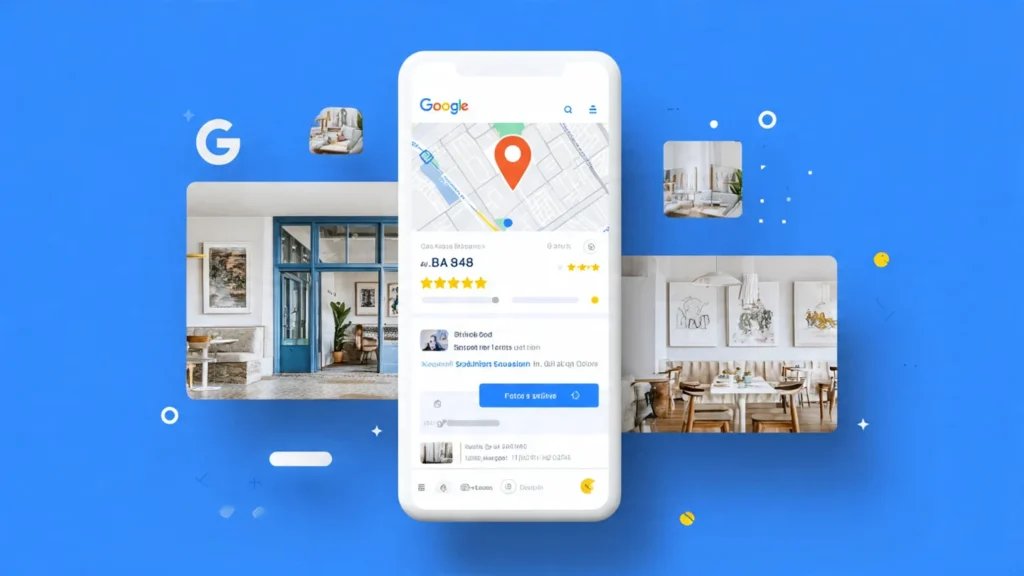
Your Google Business Profile creates your business’s presence across Google Search and Google Maps. When users search phrases like “coffee shop near me” or “plumber in Madurai”, well-optimized Business Profiles appear first—showcasing photos, reviews, business hours, directions, and contact details that directly drive calls, visits, and leads.
Key Features
- Business location visibility on Google Maps
- Photos and videos showcase
- Customer review collection and management
- Business hours and special holiday hours
- Direct messaging with customers
- Post updates (offers, events, announcements)
- Booking buttons (when integrated)
- Q&A section for customer questions
- Performance insights (views, clicks, calls, direction requests)
- Multiple location management
Why It’s Essential
With Google controlling nearly 90% of the global organic search market, Google Business Profile is the highest-converting free marketing tool for local businesses. It connects potential customers directly to your phone number, directions, reviews, and business details at the exact moment they’re ready to buy.
Real-World Example
A small bakery in Coimbatore claimed and optimized their Business Profile by uploading 15 high-quality photos, maintaining accurate business hours, and actively encouraging customer reviews. In just 60 days, they recorded 340 direction requests, 156 phone calls, and 43 website clicks—all tracked for free through Profile insights. Their monthly revenue increased by 34%.
How to Get Started
- Go to business.google.com
- Enter your business name
- Choose your category (be specific)
- Add your exact address or service area
- Verify your business (postcard, phone, or email)
- Complete all sections (description, services, hours, photos)
- Post weekly updates
- Respond to every customer review within 24 hours
Optimization Secrets
- Upload 10–15 high-quality photos (interior, exterior, products, team)
- Select all relevant categories (primary + secondary)
- Fill out every attribute and service listing
- Post 2–3 updates per week (offers, tips, behind-the-scenes)
- Collect reviews systematically (QR codes, follow-up emails)
- Respond to reviews professionally—even negative ones
Best For
Any business with physical locations—restaurants, salons, clinics, shops, offices, and service providers. Equally powerful for service-area businesses like plumbers, electricians, and home services.
4. Canva – Professional Graphic Design
What It Does
Canva is a powerful drag-and-drop design platform that lets anyone create professional-quality graphics without prior design experience. From social media posts and presentations to flyers, posters, and marketing materials, Canva’s ready-made templates make every user look like a professional designer.

Free Features
- 250,000+ professionally designed free templates
- 5GB cloud storage
- Hundreds of thousands of free images and graphics
- Basic photo editing (crop, filters, brightness, adjustments)
- Text effects and wide font library
- Limited social media scheduling
- Brand kit (1 brand on free plan)
- Team collaboration (up to 5 people free)
- Download designs as PNG, JPG, or PDF
- Presentation mode
- Basic animation effects
Why It’s Essential
Visual content is non-negotiable in modern digital marketing. Every social media post, blog feature image, email header, and ad creative needs polished design. Canva delivers this capability for free—removing the need for expensive tools like Adobe Creative Suite (₹4,000+/month) or recurring designer costs (₹500–₹2,000 per graphic).
Real-World Example
A Mumbai-based fitness coach created all her Instagram visuals using Canva’s free plan—workout tips, motivational quotes, transformation posts, and program launches. She spent just 90 minutes per week batch-creating 14 posts. Within 8 months, her professionally branded feed attracted 12,000 followers, resulting in 45 paying clients at ₹15,000 each.
How to Get Started
- Visit canva.com
- Sign up for a free account (email or Google login)
- Search for a template type (Instagram post, presentation, flyer, etc.)
- Customize text, colors, and images
- Download as PNG or JPG
- Repeat for all marketing visuals
Design Tips for Non-Designers
- Stick to 2–3 brand colors consistently
- Use templates as starting points—don’t design from scratch
- Choose simple, readable fonts
- Use white space—avoid overcrowding designs
- Maintain visual consistency across all graphics
- Use Canva’s color palette generator from your logo
Limitations
Canva’s free plan has fewer templates than Pro (610,000+ templates), doesn’t support automatic background removal, and allows only limited brand kit functionality. That said, the free version is more than sufficient for 90% of small business and creator needs.
Best For
Social media managers, bloggers, small business owners, solopreneurs, and marketers producing frequent visual content. Essential for anyone posting on Instagram, Facebook, LinkedIn, Pinterest, or YouTube.
5. Mailchimp – Email Marketing Automation
What It Does
Mailchimp helps you manage your email list, design professional newsletters, automate email sequences, and track campaign performance in one dashboard. It’s an industry-standard email marketing platform with a generous free tier, making it ideal for beginners and growing businesses.

Free Plan Includes
- Up to 500 subscribers
- 1,000 monthly email sends
- Single audience (email list)
- Drag-and-drop email builder with templates
- Basic automation (welcome emails, abandoned cart)
- Landing pages (1 live at a time)
- Signup forms and pop-ups for list building
- Basic reporting (open rates, click-through rates)
- Mobile app access
- Website integrations
- Single-step automation workflows
Why It’s Essential
Email marketing delivers the highest ROI of any marketing channel—around $42 return for every $1 spent. Your email list is a digital asset you truly own. Social platforms can restrict reach or suspend accounts, but your email subscribers remain yours forever. Mailchimp gives you free infrastructure to build, nurture, and monetize this asset.
Real-World Example
A digital product creator offered a free PDF checklist on her website, collecting emails using a Mailchimp signup form. She automated a 5-email welcome sequence that educated subscribers and built trust, then promoted her ₹2,999 online course. With just 430 subscribers, the sequence converted at 8.7%—resulting in 37 sales and ₹1,10,963 revenue, completely on autopilot.
How to Get Started
- Go to mailchimp.com
- Sign up for a free account
- Create an audience (import contacts or start fresh)
- Design a signup form for your website
- Create a welcome email automation
- Send your first campaign or activate a sequence
- Monitor performance in the Reports section
Email Marketing Best Practices
- Keep subject lines under 40 characters (mobile-friendly)
- Personalize emails using subscriber first names
- Deliver value before selling (educate, inform, inspire)
- Include a clear call-to-action in every email
- Send consistently (weekly or biweekly minimum)
- Segment your list by behavior and interests
- Clean your list quarterly (remove inactive subscribers)
- A/B test subject lines, send times, and content
Limitations
The 500-subscriber limit restricts scaling, and once exceeded, plans start at approximately ₹1,200/month. The free plan also includes Mailchimp branding and limited automation options. However, it’s perfect for beginners to validate an email strategy before upgrading.
Best For
Bloggers, course creators, e-commerce stores, consultants, agencies, and service providers building email lists. Start here before moving to paid tools like ConvertKit or ActiveCampaign.

Free Plan Includes
- 3 social channels (choose from Facebook, Instagram, Twitter, LinkedIn, Pinterest, TikTok, Mastodon, Threads)
- 10 scheduled posts per channel (30 total)
- 1 team member
- Landing page builder (1 page)
- AI assistant for content ideas (10 uses/month)
- Basic analytics
- Mobile apps (iOS & Android)
Why It’s Essential
Consistency drives social media growth. Buffer removes the daily burden of remembering to post by allowing batch content creation and automatic publishing. Spend 2 hours weekly creating content versus 20 minutes daily scrambling for posts.
Real-World Example
A Pune-based graphic designer struggled with inconsistent Instagram posting—3 posts one week, none for two weeks, then 5 in a day. After adopting Buffer, she spent Sunday evenings scheduling 12 posts for the upcoming week (3x per week consistently). Her engagement rate increased 127% and follower growth accelerated from 200 to 1,100 new followers monthly.
How to Get Started
- Go to buffer.com
- Sign up free
- Connect 3 social accounts
- Create posts or upload from library
- Schedule posting times (use analytics to find best times)
- Buffer publishes automatically
- Monitor performance in Analytics tab
Content Scheduling Strategy
- Monday: Industry tip or insight
- Wednesday: Behind-the-scenes or personal story
- Friday: Weekend inspiration or entertainment
Schedule for optimal times:
- Facebook: 1–4 PM weekdays
- Instagram: 11 AM–1 PM weekdays, 7–9 PM all days
- LinkedIn: 8 AM, 12 PM, 5 PM on weekdays
- Twitter: 8–10 AM, 6–9 PM all days
Limitations
10 posts per channel limits you if posting daily across platforms. Paid plans start at ₹800/month for more scheduled posts and analytics. Also, Instagram Stories and Reels require mobile posting (Buffer can't automate these directly).
Best For
Solopreneurs, small businesses, consultants, and content creators managing 2–3 social platforms. Perfect for maintaining consistent presence without constant manual posting.
7. Ubersuggest – Keyword Research & SEO
What It Does
Ubersuggest researches keywords, analyzes competitors, tracks rankings, and audits website SEO. It's Neil Patel's free alternative to expensive tools like Ahrefs (₹8,000+/month) and SEMrush (₹10,000+/month).

Free Features
- 3 keyword searches per day
- Keyword search volume and difficulty
- Related keyword suggestions
- Content ideas based on keywords
- Competitor analysis (limited data)
- Basic site audit (shows errors and warnings)
- Backlink data (limited)
- Top-ranking pages for keywords
- Keyword ranking tracking (limited)
Why It’s Essential
Ubersuggest helps with keyword research, providing relevant data for free. You cannot create content that ranks without understanding what people search for and how competitive those terms are. Ubersuggest provides this intelligence at zero cost.
Real-World Example
A travel blogger wanted to write about Goa tourism but didn't know which angle to take. Using Ubersuggest, she discovered "best time to visit Goa" had 18,000 monthly searches and medium difficulty, while "Goa itinerary 5 days" had 6,600 searches with low difficulty. She wrote the second article, ranked #3 within 8 weeks, and received 1,400 monthly visitors from that single post.
How to Get Started
- Go to ubersuggest.com or neilpatel.com/ubersuggest
- Enter a keyword relevant to your business
- Review search volume, competition, and difficulty
- Explore "Keyword Ideas" for related terms
- Check "Content Ideas" to see what already ranks
- Choose low-competition, high-volume keywords for your content
- Track your rankings in dashboard (free tier limited)
Keyword Research Process
- Brainstorm seed keywords (main topics)
- Enter each in Ubersuggest
- Export keyword ideas (CSV available)
- Filter for:
- Search volume: 1,000–10,000/month (sweet spot)
- SEO Difficulty: 0–40 (achievable for new sites)
- Paid Difficulty: Any
- Select 10 keywords
- Create content targeting those keywords
Limitations
3 free searches daily restricts extensive research. Paid version ($29/month) removes limits and adds features like unlimited searches, full site audits, and detailed backlink analysis. For beginners, 3 daily searches suffice initially.
Best For
Bloggers, content marketers, SEO beginners, and website owners wanting to understand keyword opportunities without expensive subscriptions.
8. ChatGPT (Free Tier) – AI Content Assistant
What It Does
ChatGPT generates content, brainstorms ideas, writes ad copy, creates social media posts, drafts emails, outlines articles, answers questions, and assists with virtually any marketing writing task. It’s a free AI tool (limited to GPT-4o mini on the free tier) that can replace expensive content creation services.
Free Tier Includes
- Unlimited messages with GPT-4o mini (fast, capable model)
- Limited GPT-4o access (more advanced reasoning)
- Web browsing for current information
- Image generation (DALL-E 3)
- Code execution for data analysis
- File uploads and analysis
- Memory (remembers context within conversation)
- Custom instructions
- Mobile app access
Why It’s Essential
Content creation consumes massive time. ChatGPT reduces a 2-hour writing task to 20 minutes of editing. It generates first drafts, headlines, marketing angles, and creative concepts instantly, allowing marketers to focus on strategy and refinement rather than staring at blank pages.
Real-World Example
A marketing consultant used ChatGPT to generate 30 LinkedIn post ideas every Monday in 10 minutes. She input "Generate 30 LinkedIn post topics about digital marketing trends, productivity tips, and client success stories" and received a complete list. She elaborated on 3 per week, posting consistently. Her LinkedIn following grew from 800 to 4,200 in 5 months, generating 12 consulting inquiries worth ₹6.8 lakh.
How to Get Started
- Go to chat.openai.com
- Sign up free (email or Google)
- Start asking questions or giving instructions
- Refine responses with follow-up prompts
- Copy useful outputs to your documents
- Create custom instructions (Settings → Personalization) for consistent behavior
Effective Prompts for Marketing
- Content ideas: "Generate 20 blog post ideas about [your niche] that solve common problems for [target audience]"
- Social media: "Write 5 Instagram captions for [product/service] that are engaging, include emojis, and have strong calls-to-action"
- Email marketing: "Create a 3-email welcome sequence for new subscribers interested in [topic]. Each email should provide value and build toward offering [product]"
- Ad copy: "Write 10 Facebook ad headlines for [product] targeting [audience]. Focus on [main benefit]"
- SEO content: "Outline a comprehensive blog post about [keyword] that covers user intent, answers common questions, and is structured for SEO"
Limitations
Free tier has usage limits during peak times (responses may be slower). GPT-4o access is limited compared to Plus subscribers ($20/month). ChatGPT's knowledge cutoff means it doesn't know events after its training date without web search enabled.
Best For
Content creators, copywriters, social media managers, bloggers, and anyone creating written marketing materials regularly. Essential for overcoming writer's block and accelerating content production.


Free Plan Includes
- Unlimited cards (tasks)
- Unlimited boards (projects)
- 10 boards per workspace
- Unlimited storage (10MB per file attachment)
- iOS and Android mobile apps
- Butler automation (runs/month limit)
- Custom fields
- Checklists and due dates
- Team collaboration
- Activity log
- Template gallery access
Why It’s Essential
Sticky notes fall off and disappear into the void, making physical organization unreliable. Trello creates a centralized visual system for managing all marketing activities—content calendars, campaign planning, client projects, and idea tracking—accessible anywhere from any device.
Real-World Example
A social media agency managing 5 clients created a Trello board for each client with lists for "Ideas," "To Create," "In Review," "Scheduled," and "Published." Every team member saw exactly what needed creation, approval status, and publication dates. This eliminated missed deadlines, duplicate work, and confused clients. The agency onboarded 3 more clients without hiring additional staff.
How to Get Started
- Go to trello.com
- Sign up free
- Create first board (e.g., "Content Calendar")
- Add lists (e.g., "Ideas," "Writing," "Editing," "Scheduled," "Published")
- Create cards for each piece of content
- Add due dates, checklists, attachments, and labels
- Drag cards across lists as they progress
- Invite team members to collaborate
Board Templates for Marketing
- Content Calendar Board: Lists: January, February, March, etc.; Cards: Each piece of content; Labels: Blog, Social, Email, Video
- Campaign Management Board: Lists: Planning, Design, Approval, Launch, Active, Complete; Cards: Each campaign or promotion; Due dates: Launch dates
- Client Management Board: Lists: Each client name; Cards: Deliverables, meetings, invoices; Labels: Urgent, In progress, Waiting
Limitations
Free plan limits advanced automation (Power-Ups) and views (Calendar, Timeline). Paid plans start at ₹400/month for enhanced automation and unlimited Power-Ups. However, free version handles most small team needs.
Best For
Solopreneurs juggling multiple projects, small marketing teams, agencies managing clients, content creators planning editorial calendars, and anyone needing visual project organization.

Features (Completely Free)
- Readability grade level scoring
- Sentence complexity highlighting
- Passive voice detection
- Adverb overuse alerts
- Complex phrase identification
- Hard-to-read sentence flagging
- Word and character count
- Estimated reading time
- Desktop app and web version both free
Why It’s Essential
Hemingway Editor checks your copy for tone, voice, grammar, and readability. Clear writing converts better than complex writing. Most audiences read at 8th-grade level—Hemingway ensures your marketing content remains accessible, scannable, and persuasive regardless of reader sophistication.
Real-World Example
An insurance agent rewrote his website homepage from Grade 16 (college-level) to Grade 8 using Hemingway's suggestions. He simplified technical jargon, shortened sentences, and removed passive voice. Bounce rate decreased from 68% to 41%, and contact form submissions increased 93%. Clearer communication drove better results.
How to Get Started
- Go to hemingwayapp.com
- Paste your writing into the editor (or type directly)
- Review colored highlights:
- Yellow: Hard to read (shorten or split)
- Red: Very hard to read (must simplify)
- Purple: Simpler alternatives available
- Blue: Adverbs (eliminate when possible)
- Green: Passive voice (rewrite in active voice)
- Aim for Grade 8 or lower for maximum readability
- Edit until most highlights disappear
- Copy polished version back to your document
Writing Improvement Tips
Before Hemingway: "The implementation of our comprehensive digital marketing solutions enables businesses to optimize their online presence and maximize customer engagement across multiple channels, resulting in improved ROI." (Grade 21, 1 passive voice, 1 complex phrase)
After Hemingway: "Our digital marketing services help businesses grow their online presence and connect with more customers. The result? Better returns on your investment." (Grade 6, active voice, clear)
Limitations
Hemingway focuses purely on readability, not grammar or spelling. You'll still need Grammarly or similar for catching typos. Also, it's overly aggressive with adverbs—sometimes they're necessary for meaning. Use judgment when accepting suggestions.
Best For
Bloggers, copywriters, content marketers, website owners, and anyone writing marketing materials. Especially valuable for technical industries needing to communicate complex topics simply.
Bonus Tool Mentions Worth Knowing
- Google Trends (Free) – Tracks search interest over time, compares keyword popularity, and reveals trending topics. Essential for content timing and topic validation.
- AnswerThePublic (3 Free Searches/Day) – Visualizes questions people ask about keywords. Perfect for FAQ content and blog topic ideation based on actual search behavior.
- Pixabay & Unsplash (Free) – High-quality stock photos for marketing materials. Pixabay offers photos, illustrations, vectors, videos, and royalty-free music, eliminating expensive stock photography subscriptions.
- LinkedIn (Free) – Personal and company pages provide free networking, content distribution, and lead generation. Publishing long-form articles directly on LinkedIn reaches professional audiences without blog hosting.
- YouTube (Free) – Second-largest search engine globally. Creating video content and hosting on YouTube provides free video hosting, SEO benefits, and audience building.
Frequently Asked Questions
Conclusion: Free Doesn't Mean Limited
The digital marketing tools landscape has evolved dramatically. What once required enterprise budgets now exists in powerful, free versions accessible to anyone with internet access.
These 10 free tools provide everything needed to launch, grow, and scale online marketing efforts:
- Analytics foundation: Google Analytics, Search Console, Business Profile
- Content creation: ChatGPT, Canva, Hemingway
- Distribution: Buffer, Mailchimp
- Research: Ubersuggest
- Organization: Trello
The limitation isn't the tools—it's consistent execution. Businesses fail not from using free tools but from inconsistent implementation, lack of strategy, or abandoning efforts before results compound.
Start with 3-5 tools matching your immediate needs. Master those completely. Add others as processes mature and specific gaps emerge. The combination of zero-cost tools and consistent effort rivals any expensive marketing stack.
Your competitors may have bigger budgets, but these free tools level the playing field. Strategy, creativity, and persistence determine success—not software subscription fees.
Action step: Choose 3 tools from this list. Sign up today. Commit to using them consistently for 90 days. Track results. Adjust. The tools are free—the results are priceless.